Top 2 New Features in Windows Server 2016 Technical Preview 3

Top 2 New Features in Windows Server 2016 Technical Preview 3

Windows Server 2016
Recently, Microsoft announced the general availability of Windows Server 2016 Technical Preview 3.  There are number of improvements and new features in Windows Server 2016 but it comes with top 2 new features.  These are Windows Server Containers and Nano Server. A highlighted new feature for this release is the Windows Server Containers. This is the first step in bringing containers to the Windows Server. Containers provide users with a way to run applications isolated from the rest of the operating environment. Windows Server Containers are part of the Docker open source project based on Linux technology. Docker and Microsoft are partnering to bring both Windows Server and Docker containers to Windows, and allowing developers to manage them with the standard Docker tools. These containers can be deployed and managed either using…

Read More
How to Configure Wake-on-LAN in Windows 10 and Windows 8.1

How to Configure Wake-on-LAN in Windows 10 and Windows 8.1

Windows
Wake-on-LAN (WOL): It is a feature for remotely waking up computers. Wake-on-LAN enabled computer listens for a magic packet containing its MAC address so that you can send magic packets that will wake up computer over the LAN or Internet. In this article I will cover whole steps to configure Wake-on-LAN (WOL) in Windows 10 or Windows 8.1. Steps to Configure Wake-on-LAN on Windows 10 and Windows 8.1 1. First, you must enable Wake-on-LAN feature in the BIOS if you have integrated Ethernet network adapter. For Asus mainboards, it is located at Advanced --> APM--> Power On By PCI-E/PCI. If you do not see this option in your BIOS, check motherboard vendor manual to see if it supports Wake-on-LAN feature. 2. Login to your windows 10 or windows 8.1 computer and open Device Manager by pressing Win…
Read More
SSTP Windows VPN Client Error: The revocation function was unable to check revocation

SSTP Windows VPN Client Error: The revocation function was unable to check revocation

Windows
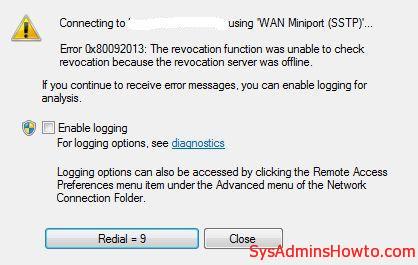
You followed all steps from a Deploying SSTP Remote Access Step by Step Guide. However, when windows 8.1 or windows 7 client tries to connect VPN server you get this error: " Error 0x80092013: The revocation function was unable to check revocation because the revocation server was offline. " The SSL VPN client needs to be able to download the CRL to confirm that the server certificate on the VPN server has not been revoked. You must either publish the CRL on a server that is accessible on the Internet or configure the client to not require CRL checking.. Because it exposes a private server name to the Internet, you can do the following as an alternative solution. Disable CRL Checking on VPN Client Start Registry Editor (Regedit.exe). Locate and…
Read More
Wake on Lan (WOL) does NOT Work in Windows 10 After Upgrade from Windows 8.1 or Windows 7

Wake on Lan (WOL) does NOT Work in Windows 10 After Upgrade from Windows 8.1 or Windows 7

Windows
What is Wake-on-LAN (WOL)? It is powerful and convenient feature that enables users to remotely power up their computer over a network, saving energy while also allowing remote access to the computer when needed. Windows 10 Wake-on-LAN Problem Wake-on-LAN (WOL) does not work or stopped working in Windows 10 after upgrade from Windows 8.1 or Windows 7. In my case, I use Realtek PCIe GBE Family Controller. Even though I did all settings for Wake-on-LAN such as disabling turn on fast startup, configuring adapter options related to WOL, and etc, WOL is not working. My environment: Previous OS: Windows 8.1 Pro x64 Current OS: Windows 10 Pro x64 Mainboard: Asus H87-Plus NIC: Onboard Realtek PCIe GBE Family Controller NIC driver version: 9.1.401.2015 released on April 1, 2015 Cause: Realtek Ethernet Card driver…
Read More